Using Audio-Technica ATR2100x-USB
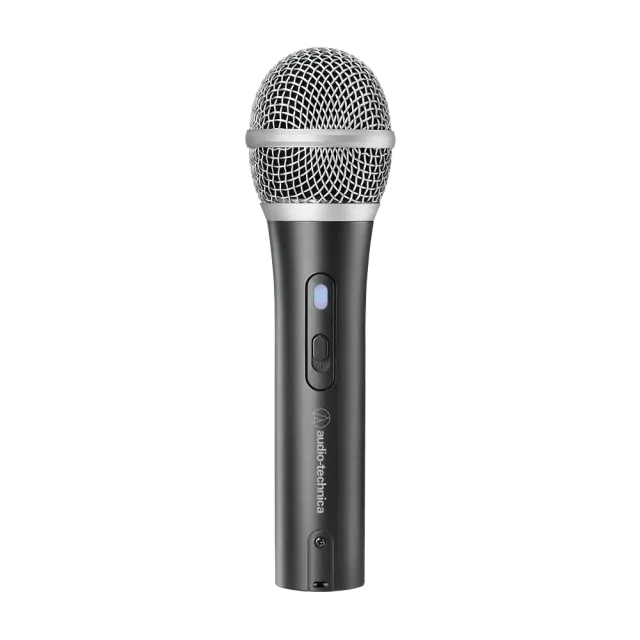
A cardioid dynamic microphone with USB-C and XLR outputs, an on/off switch, and headphone monitoring. USB is the simpler route for a coding desk. This is a coding-workflow accessory: it captures audio for software on your computer. It is not a programmable AI device or an AI transcription subscription.
A good fit for
People who use dictation with a coding assistant and want a separate USB microphone.
Not the right fit for
A microphone that independently runs an AI model, transcribes speech, or guarantees compatibility with every editor.
Compatibility
- Exact hardware
- Audio-Technica ATR2100x-USB
- Software route
- USB audio input + host dictation
- Where code runs
- Audio capture happens on the microphone; transcription and coding tools run on your computer or their chosen cloud services.
- Development tools
- A compatible computer and dictation software. A coding subscription does not include transcription.
- Evidence
- Official docs. Not hands-on tested.
Project ideas
- 01Dictate a prompt into your coding environment
- 02Capture a spoken note for review before sending
Getting started
- 01
Try your existing microphone first
You do not need a special AI microphone. A microphone captures audio; your dictation software turns it into text; your coding assistant receives that text. Try one real prompt with the laptop mic or headset you already own before buying anything. Describe the outcome, constraints, and a concrete example. Read the transcript before sending it. File paths, variable names, punctuation, and shell commands are exactly where an innocent transcription mistake can matter.
- 02
Choose the connection before the microphone
For a straightforward desk setup, start with USB. The Wave Neo connects directly to a PC or Mac, includes a stand, and has touch-to-mute. Elgato recommends speaking into its side at roughly 8–12 cm. Position and background noise matter; this is not a promise of better transcription. The ATR2100x-USB offers USB-C and XLR, plus a headphone jack and an on/off switch. Its USB output can connect directly to the computer. Buying an XLR-only setup introduces an audio interface and more cables; you do not need that just to dictate prompts.
- 03
Keep the shopping list short
Required: a compatible computer, a microphone, the correct USB cable or adapter, and dictation software that works in your target application. Your coding-tool subscription does not automatically include a separate transcription subscription. Optional: headphones to inspect the signal, a boom arm to position the mic, and a programmable pedal. Start with a keyboard shortcut; add a pedal only if the workflow is useful.
Using it with coding tools
A cardioid dynamic microphone with USB-C and XLR outputs, an on/off switch, and headphone monitoring. USB is the simpler route for a coding desk.
You’ll need: A Windows or Mac computer, a compatible USB cable, and dictation software. The manufacturer lists a tripod stand and USB-C/USB-A cables in the box; check your local bundle.
The linked manufacturer page is Australian. Confirm local availability and the exact ATR2100x-USB model. XLR use needs a separate audio interface; USB does not.
Try your existing microphone first
You do not need a special AI microphone. A microphone captures audio; your dictation software turns it into text; your coding assistant receives that text. Try one real prompt with the laptop mic or headset you already own before buying anything.
Describe the outcome, constraints, and a concrete example. Read the transcript before sending it. File paths, variable names, punctuation, and shell commands are exactly where an innocent transcription mistake can matter.
Choose the connection before the microphone
For a straightforward desk setup, start with USB. The Wave Neo connects directly to a PC or Mac, includes a stand, and has touch-to-mute. Elgato recommends speaking into its side at roughly 8–12 cm. Position and background noise matter; this is not a promise of better transcription.
The ATR2100x-USB offers USB-C and XLR, plus a headphone jack and an on/off switch. Its USB output can connect directly to the computer. Buying an XLR-only setup introduces an audio interface and more cables; you do not need that just to dictate prompts.
Keep the shopping list short
Required: a compatible computer, a microphone, the correct USB cable or adapter, and dictation software that works in your target application. Your coding-tool subscription does not automatically include a separate transcription subscription.
Optional: headphones to inspect the signal, a boom arm to position the mic, and a programmable pedal. Start with a keyboard shortcut; add a pedal only if the workflow is useful.
Test before using private code
Select the microphone explicitly in your system and dictation app. Record a short sample, check the mute control, and dictate into a blank document. Then try the same flow in your editor or terminal without executing anything.
Check whether your chosen transcription mode processes audio locally or in the cloud, and what it retains. Do not dictate credentials or client information until that matches your policies. Keep automatic send and automatic command execution off.
Further reading
Setup & technical references
Starter prompt
Help me configure Audio-Technica ATR2100x-USB as a USB audio input for dictation. Ask for my operating system and dictation app. Check its official setup guide. Do not flash firmware or assume native Claude/Cursor integration. Test in a blank document, review transcription, and keep automatic send and command execution disabled.
Confirm your exact hardware before running device-changing commands.
Common questions
Does it include AI transcription?
No. Use a separate compatible dictation app or operating-system dictation, which may have its own subscription and privacy terms.
Can I use USB without an audio interface?
Yes. The documented USB connection goes to a compatible computer. Check your ports, cable and operating system.
Is this an official Claude or Cursor accessory?
No official integration is claimed. It supplies audio to your chosen dictation software; test text input in the specific app you use.