About the directory & our standards

Buttons & controls / Device firmware

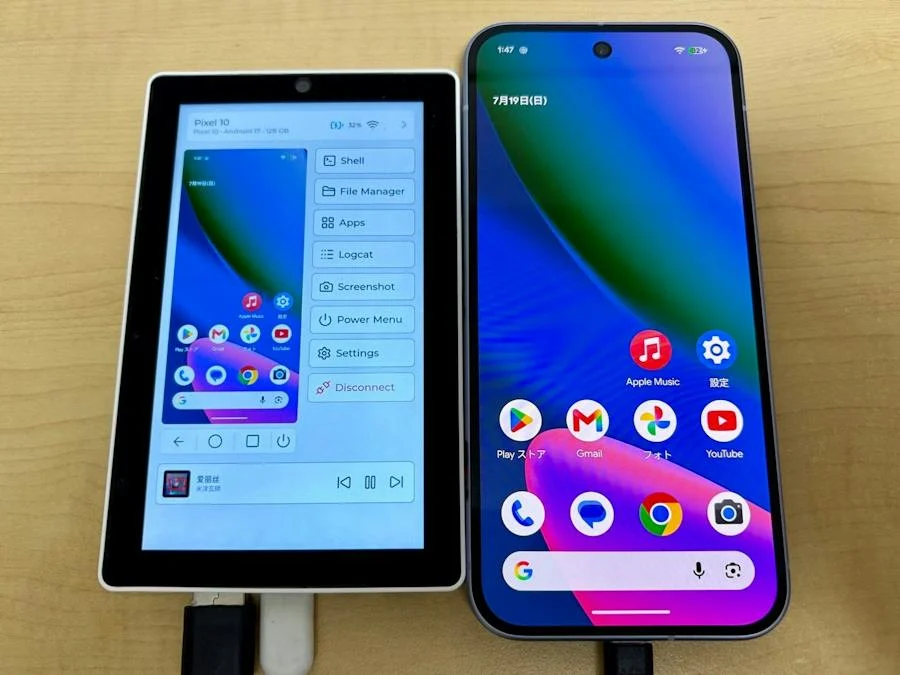
Control an Android device from a standalone Tab5

Mirror an Android screen, use touch controls, transfer files and inspect logs from a handheld console instead of a PC.

Read the original build See shopping list
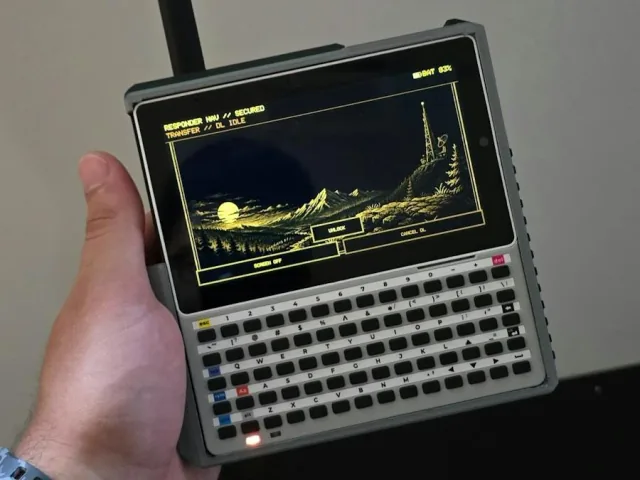
Hiroki Kawakami's M5Stack Tab5 Android control console
Hiroki Kawakami · original project photo via Hackster

What the hardware does

Custom Tab5 firmware implements an ADB host, decodes a live video stream with the ESP32-P4's JPEG hardware and sends touchscreen gestures to a connected Android device over USB or TCP/IP.

How the agent helped

Hiroki Kawakami says he delegated much of the implementation, refactoring, testing and automated UI checking to Claude Code, then performed final validation and performance tuning on the real Tab5. His article describes the host simulator, ADB transport and display pipeline.

Before you build

Flash with M5Burner and authorize USB debugging only on your own Android device. The current user guide supports wireless-debugging pairing as well as classic TCP/IP; use trusted networks and disable debugging afterwards. Audio forwarding requires Android 12+. Screenshot, log and file storage uses a microSD card. These permissions permit shell commands, app changes and file access.

Follow the build

hackster.io

Original build story

Creator build article
github.com

Supporting source

Shopping list

Save as Markdown

USB and wireless ADB are alternative connection routes. Current user guide supports Android wireless-debugging pairing; disable debugging after use.

Quantities are for one build. Unless marked source-specified, they are planning quantities; confirm kit contents and the chosen configuration before ordering.

  1. Qty. 1Plan / confirm
    Required

    M5Stack Tab5 IoT Development Kit

    ADB console.

    Sources & quantity basis

    Creator source. Planning quantity for one build; check the selected configuration.

    View product

    Product page

  2. Qty. 1Plan / confirm
    Required

    Android phone or tablet

    Device being controlled.

    Audio forwarding requires Android 12+. USB debugging authorization is required for USB control.

    Sources & quantity basis

    Creator source. Planning quantity for one build; check the selected configuration.

    No exact purchase link verified; confirm the model and requirements above before ordering.

  3. Qty. 1Plan / confirm
    Required

    USB (Tab5 host to Android) data cable

    Connect to the computer for programming or data.

    Match the Android connector; connect through the Tab5 USB host arrangement.

    Sources & quantity basis

    Setup requirement — check against your configuration. Planning quantity for one build; check the selected configuration.

    Use existing equipment or match the specification above. No exact purchase link verified.

  4. Qty. 1Plan / confirm
    Tool

    USB-C data cable

    Connect to the computer for programming or data.

    Separate setup cable to flash the Tab5 from a computer. Example requires a USB-A host port. If your computer has only USB-C, use an appropriate USB-C data cable instead. Reuse the device’s included cable where possible; this is not a standalone power-supply recommendation.

    Sources & quantity basis

    Setup requirement — check against your configuration. Planning quantity for one build; check the selected configuration.

    Example part

    Accessory example: USB-A to USB-C, 1 m, data capable

  5. Qty. 1Plan / confirm
    Tool

    Computer for setup

    Build, configure or flash the software.

    Sources & quantity basis

    Setup requirement — check against your configuration. Planning quantity for one build; check the selected configuration.

    Use existing equipment or match the specification above. No exact purchase link verified.

  6. Qty. 1Plan / confirm
    Conditional

    microSD card

    Firmware, operating system or project storage.

    Needed for local screenshots, saved logs, files and APK storage.

    Sources & quantity basis

    Creator source. Planning quantity for one build; check the selected configuration.

    No exact purchase link verified; confirm the model and requirements above before ordering.

  7. Qty. 1Plan / confirm
    Required

    Device power supply

    Power the device.

    Tab5 Kit and standard Tab5 have different battery contents; check the ordered bundle.

    Sources & quantity basis

    Setup requirement — check against your configuration. Planning quantity for one build; check the selected configuration.

    Use existing equipment or match the specification above. No exact purchase link verified.

  8. Qty. ExistingPlan / confirm
    Optional

    Trusted Wi-Fi network

    Wireless ADB route.

    Sources & quantity basis

    Setup requirement — check against your configuration. Planning quantity for one build; check the selected configuration.

    Use existing equipment or match the specification above. No exact purchase link verified.

Source reviewed, not assembled or hands-on tested. A working product page does not confirm stock, firmware compatibility or a complete build.

Built something with a coding agent?

Share your hardware project so others can try it.

Submit a project