About the directory & our standards

Cameras & sensors / Computer companion

Rescue family film negatives with a custom scanner stack

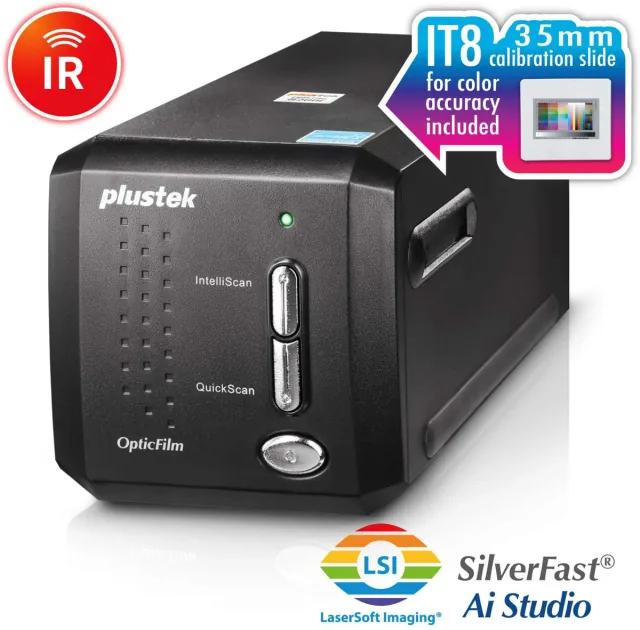
Custom Linux scanner backend plus Negative Vibes app, including infrared dust removal and nondestructive image adjustments.

Read the original build See shopping list
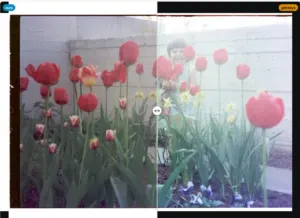
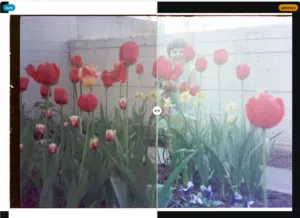
comparison of two scanner drivers on same negative-
Christian F. K. Schaller · actual scan comparison

What the hardware does

A custom backend operates the film scanner and its infrared dust-removal channel.

How the agent helped

Christian Schaller explains building the scanner backend and Rust app with Claude, comparing Windows USB traces and testing real scans.

Before you build

Confirm the Genesys GL128 chipset: older scanners with the same model name differ. Upstream SANE support also exists.

Follow the build

blogs.gnome.org

Original build story

First-person build article

github.com
Supporting source

Shopping list

Save as Markdown

Parts for one build. Reuse equipment you already own. Quantities are planning quantities unless the creator explicitly specifies a count; kit contents are not additional purchases.

Confirm before buying

  • The same 8200i name can cover different chipsets. A seller must confirm GL128; the Ai software bundle is not evidence of chipset compatibility.

Quantities are for one build. Unless marked source-specified, they are planning quantities; confirm kit contents and the chosen configuration before ordering.

  1. Qty. 1Plan / confirm
    Required

    Plustek OpticFilm 8200i with Genesys GL128

    Film scanner.

    The product page does not guarantee the GL128 hardware revision; confirm chipset before purchase.

    Sources & quantity basis

    Creator source. Planning quantity for one build; check the selected configuration.

    View product

    Product page

  2. Qty. 1Plan / confirm
    Required

    Linux computer

    Build, configure or flash the software.

    Follow the current scanner application requirements.

    Sources & quantity basis

    Setup requirement — check against your configuration. Planning quantity for one build; check the selected configuration.

    Use existing equipment or match the specification above. No exact purchase link verified.

  3. Qty. 1Plan / confirm
    Required

    USB scanner data cable

    Connect to the computer for programming or data.

    Match the included scanner cable and computer port.

    Sources & quantity basis

    Setup requirement — check against your configuration. Planning quantity for one build; check the selected configuration.

    Use existing equipment or match the specification above. No exact purchase link verified.

  4. Qty. 1Plan / confirm
    Required

    Device power supply

    Power the device.

    Use the scanner’s matched power adapter.

    Sources & quantity basis

    Setup requirement — check against your configuration. Planning quantity for one build; check the selected configuration.

    Use existing equipment or match the specification above. No exact purchase link verified.

  5. Qty. SetPlan / confirm
    Required

    35 mm film / slides and matching holders

    Material and holders for scanning.

    Check which holders are included in a used unit.

    Sources & quantity basis

    Setup requirement — check against your configuration. Planning quantity for one build; check the selected configuration.

    Use existing equipment or match the specification above. No exact purchase link verified.

Source reviewed, not assembled or hands-on tested. A working product page does not confirm stock, firmware compatibility or a complete build.

Built something with a coding agent?

Share your hardware project so others can try it.

Submit a project