Why customize CSS Electronics CANsub.2?
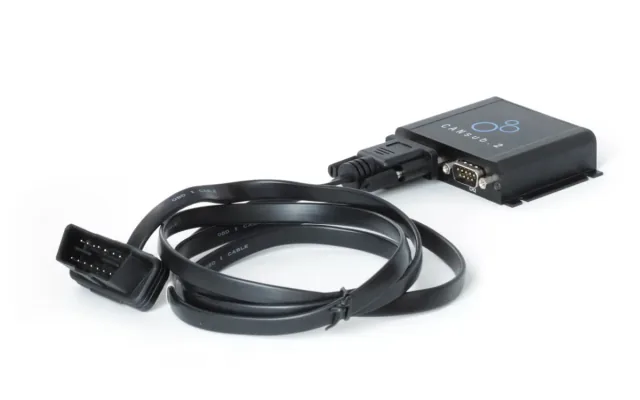
A physical CAN interface captures signals from a vehicle or test gauges for decoding. The CAN interface captures traffic; decoding and visualization run on a separate computer.
A good fit for
Capture CAN traffic. Decode real car and gauge signals with a custom CAN sniffer.
Not the right fit for
A guaranteed plug-and-play recreation without the listed hardware revisions, accessories and software setup.
Compatibility
- Exact hardware
- CSS Electronics CANsub.2
- Software route
- Listen-only CAN capture and host tools
- Where code runs
- The CAN interface captures traffic; decoding and visualization run on a separate computer.
- Development tools
- A laptop, a coding agent such as Claude Code or Cursor, and the tools listed in the guide.
- Evidence
- Source-reviewed creator project. Not hands-on tested.
Project ideas
- 01Decode real car and gauge signals with a custom CAN sniffer
Getting started
- 01
Check your model and revision
- 02
Read the creator’s setup
Use listen-only capture. Wiring and reference signals require expertise; decoded results are not safety-certified. Do not transmit control commands to a vehicle.
- 03
Start with a reversible test
Follow the linked project source before changing the device. Back up existing configuration, keep credentials private and stop if your hardware differs from the documented version.
Setup & technical references
Decode real car and gauge signals with a custom CAN sniffer
Decode real car and gauge signals with a custom CAN sniffer — supporting source
CSS Electronics CANsub.2 — Product page
Starter prompt
Help me plan decode real car and gauge signals with a custom can sniffer using CSS Electronics CANsub.2. Read https://www.csselectronics.com/pages/can-bus-reverse-engineering-ai-llm-claude and its supporting sources first. The CAN interface captures traffic; decoding and visualization run on a separate computer. Use listen-only capture. Wiring and reference signals require expertise; decoded results are not safety-certified. Do not transmit control commands to a vehicle. Confirm my exact hardware and required accessories, explain what is missing, and propose one reversible test. Ask before flashing firmware, changing privileged system settings or moving physical hardware.
Confirm your exact hardware before running device-changing commands.
Common questions
Where does my software run?
The CAN interface captures traffic; decoding and visualization run on a separate computer.
What should I check before buying?
Product page. Stock and delivery region are not confirmed. Check exact model and bundle contents with the seller.
What are the setup risks?
Use listen-only capture. Wiring and reference signals require expertise; decoded results are not safety-certified. Do not transmit control commands to a vehicle.